Blog
Free Sony S-Log3 LUT: stop-based false color for exposure (download .cube)
Summary
Free .cube for S-Log3 false color by zones—works on a7 V, a7 IV with current firmware, FX line, and other Sony bodies with user LUT monitoring. Reference levels for Resolve and field monitors.
Free Sony S-Log3 LUT: stop-based exposure zones (false color)
S-Log3 isn’t meant to look “nice” on set. The image looks flat on purpose: the curve holds a lot of range for grading later, not for judging exposure by eye. That’s where false color helps.
A false-color LUT maps specific signal levels to fixed colors. You can see middle grey, skin, and highlights at a glance instead of squinting at tiny grey shifts.
Here’s a .cube you can drop into an external monitor, a Sony monitoring output (when the body allows it), or your NLE. It expects S-Log3 input in the usual Sony 0–1 pipeline. Right now the body I see people buying most for hybrid/video work is the Sony Alpha 7 V (a7 V)—lots of search traffic there. The a7 IV is in the same conversation too once you’re on current firmware, which added user LUT monitoring in line with the cinema-line workflow.
On set what I care about most is that nobody has to guess what that flat gray means: the map mirrors the IRE anchors Sony ties to S-Log3, and the .cube applies the same logic on top of your signal so director, focus puller, and you read the same false-color picture.
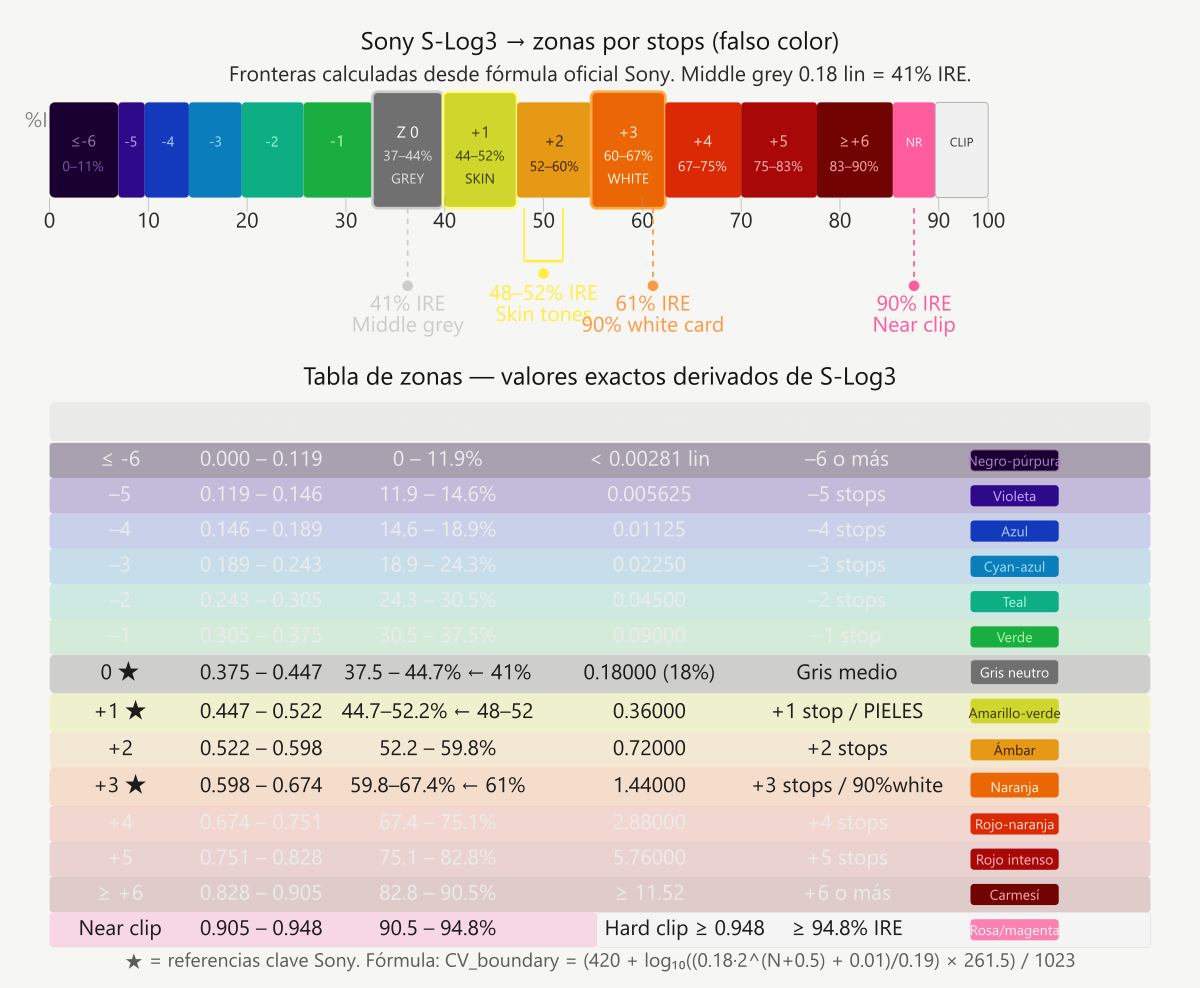
01Reference map
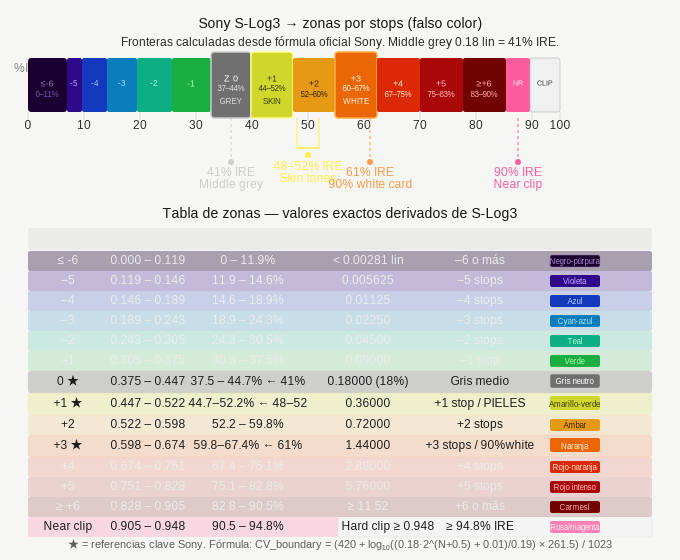
Scalable SVG for print or zoom without pixelation.
02What this LUT does (one sentence)
For each pixel it decodes S-Log3 to linear with the Sony transfer, derives linear Rec.709 luma as a practical brightness read, re-encodes to S-Log3 so monitoring stays in the same “world” as your signal, then paints a zone color from stops vs. 18% middle grey — the classic exposure anchor everyone references on set.
Zone edges aren’t eyeballed: they sit where linear level is 0.18 × 2^(N+0.5) around stop N, so each step is roughly a doubling or halving of real light between neighbors.
03Sony reference points on the chart
What Sony documents as handy S-Log3 anchors:
- 18% middle grey → about 41% IRE → center band.
- Healthy skin → typically 48–52% IRE → yellow–green band.
- 90% white card → about 61% IRE → orange band (bright, not automatically clipped).
They’re for locking exposure on location. They don’t replace a chart or a full grading suite, but they keep you honest when you’re tired and the monitor is small.
If the same day mixes α7 bodies, FX cameras, and an Atomos on the arm, the scale still makes sense because the core is always the same Sony decode and the same stops around 18% linear: you aren’t switching exposure “languages” every time you swap cameras.
04How the zones are colored (shadows to highlights)
Quick tour: purples and blues deep in shadow, greens below middle grey, grey at zone 0, yellows in the skin pocket, amber and orange up high, reds crowding the top. I also flag near clip and hard clip so you notice information loss fast.
05Where to load the .cube
Standard 3D LUT, size 33, domain 0–1. I run it in Resolve, on Atomos / SmallHD when the firmware plays ball, and in Premiere or FCP as a LUT or node. Only rule: feed it real S-Log3 — no mystery gamma conversions in between.
On multi-monitor shoots you often record log to card while the HDMI carries a LUT’d feed for the director; as long as no middle step slaps on another gamma “to look pretty” before the LUT, false color stays trustworthy. If someone sneaks a weird transform through a router or a cheap monitor, blame the chain—not the .cube.
06Importing the LUT on a Sony camera
If your body supports user LUTs for monitoring (a7 V, a7 IV on up-to-date firmware, FX3, FX6, FX30, etc.), this is the workflow I use:
- Copy the
.cubeto the LUT folder on the card. SD is usuallyPrivate/Sony/PRO/LUTfrom the card root; CFexpress Type A is usuallySony/PRO/LUTat the root (some manuals drop thePrivatewording). - Insert the card, power on.
- Manage User LUTs — on the bodies I shoot with it’s commonly under Exposure/Color or Color/Tone. Menu names shift slightly by generation; the steps don’t.
- Import, pick the card and file; it lands in slots like User1–User16.
- Assign it to LCD / HDMI monitoring while clips stay S-Log3 internally.
Keep filenames short, alphanumeric + underscore, no spaces. Sony often caps length around 63 characters including .cube. A 33-point cube is usually fine.
If your external monitor only likes ASCII names or short paths, rename the file, but don’t open the .cube in a text editor to “tweak” numbers: the header already declares size 33 and domain 0–1; breaking that invites import headaches.
07Download
08Practical note
This is a field tool for exposure and highlight protection. Final contrast and color still live in post with your creative LUT or grade.
I still glance at a waveform on long dialogue blocks, but false color stops me from chasing shadow noise or torching a cheek just because the client’s monitor looks dull.
If you bounce between Alpha and FX inside the same company, bookmark this: it’s the same zone logic; only the menu path for loading the .cube changes.
If it helps you on a shoot, send the link to someone else drowning in grey log footage.
Frequently asked questions
Straight answers to the questions readers ask most.